---
title: Job Invites
description: Agencies can invite you to a job when they have specific people in mind to whom they’d like to offer the work to.
---
[Skip to content](https://help.liveforce.co/en/crew/job-invites#main-content)
[](https://liveforce.co/)
Open main navigation
Close main navigation
- [Log In](https://app.liveforce.co/)
[Log In](https://app.liveforce.co/)
Crew App Knowledge Base
- There are no suggestions because the search field is empty.
1. [Crew App](https://help.liveforce.co/en/crew?hsLang=en)
2. [Guides](https://help.liveforce.co/en/crew/guides?hsLang=en)
3. [Job Board](https://help.liveforce.co/en/crew/guides?hsLang=en#job-board)
# Job Invites
## Agencies can invite you to a job when they have specific people in mind to whom they’d like to offer the work to.
#### **Notification**
You will receive a system notification in the app and an invite email will also be sent.
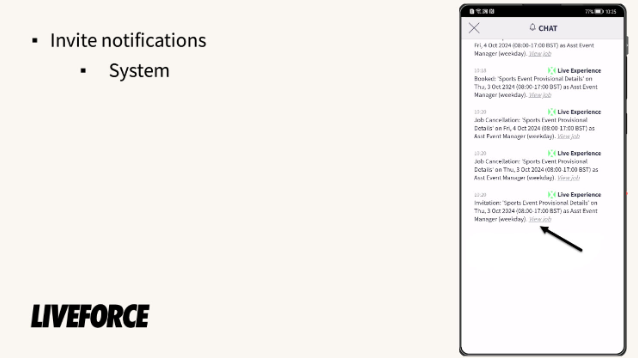
*System notification*
*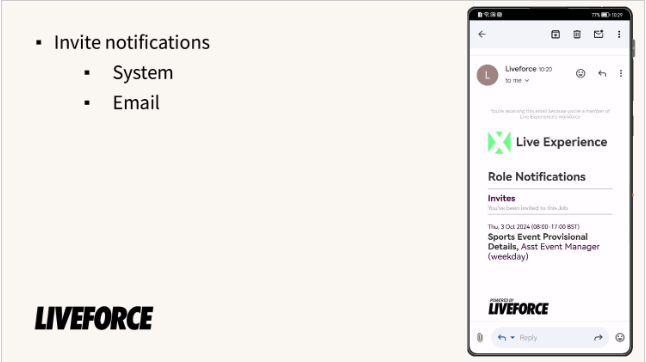*
*Email notification*
### **Push Notification**
You may receive a push notification if you have allowed the app permission to send them to your phone.
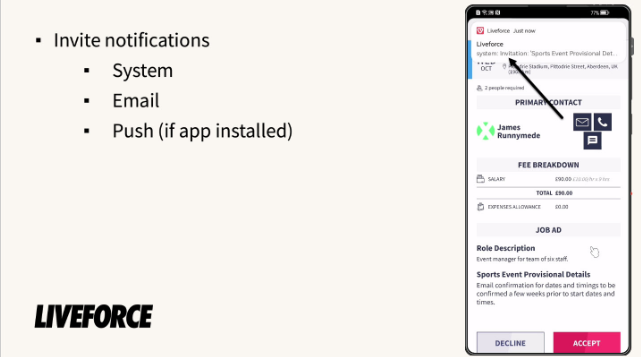
*Push notification*
#### **Job Details**
Click the job link in the message, and you will be taken to the job details page where you can read more information about the job, fee breakdown and role description.
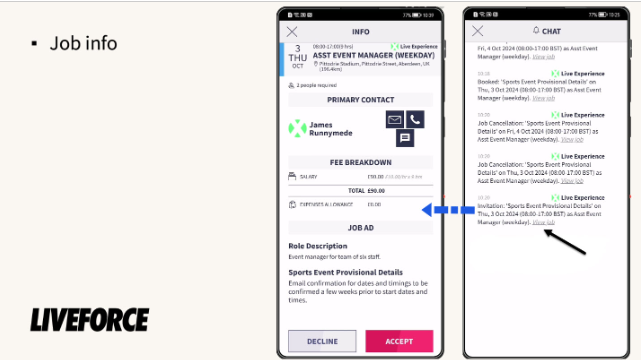
*Job info*
Invites can be recognised quickly in the platform by the blue colour code.
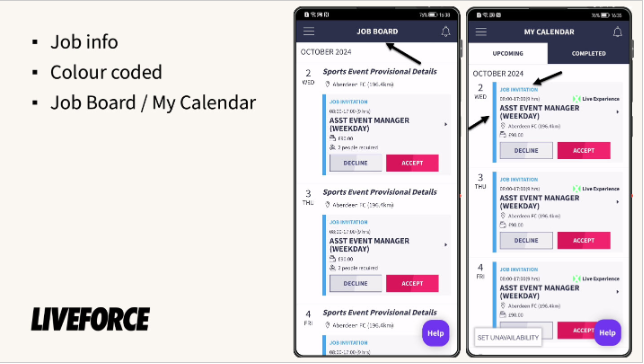
*Colour code*
### **Decline or Accept**
You can decide whether you want to decline or accept the job invite.
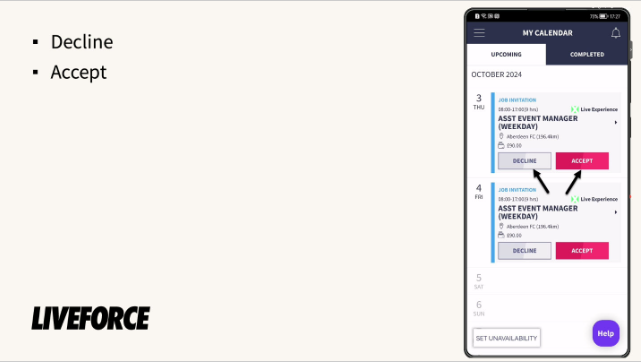
*Decline or accept job*
If you decline the job, a yellow information box appears and the invitation is removed from your calendar.
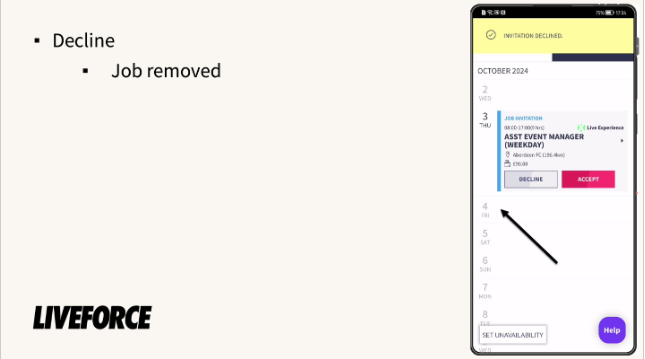
*Declined*
If you accept the job invitation, the job colour code changes to green, you receive an email, push and system notification confirming that you are booked on the job.
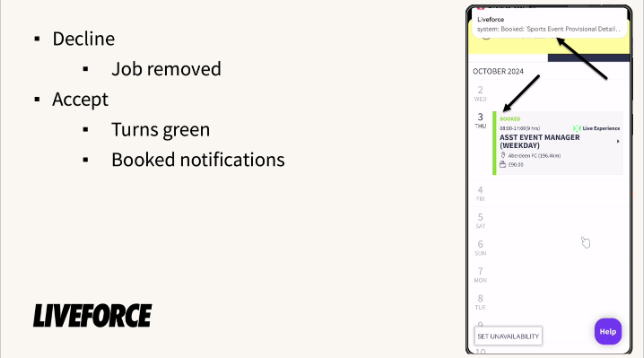
*Accepted*
- [FAQs](https://help.liveforce.co/en/crew/faqs?hsLang=en)
- [Getting started](https://help.liveforce.co/en/crew/getting-started?hsLang=en#main-content)
- [Step by Step Guide](https://help.liveforce.co/en/crew/getting-started?hsLang=en#step-by-step-guide)
- [Guides](https://help.liveforce.co/en/crew/guides?hsLang=en#main-content)
- [Notifications](https://help.liveforce.co/en/crew/guides?hsLang=en#notifications)
- [Earnings](https://help.liveforce.co/en/crew/guides?hsLang=en#earnings)
- [Timesheets and Expenses](https://help.liveforce.co/en/crew/guides?hsLang=en#timesheets-and-expenses)
- [Invoicing](https://help.liveforce.co/en/crew/guides?hsLang=en#invoicing)
- [Profile](https://help.liveforce.co/en/crew/guides?hsLang=en#profile)
- [Job Board](https://help.liveforce.co/en/crew/guides?hsLang=en#job-board)
- [My Calendar](https://help.liveforce.co/en/crew/guides?hsLang=en#my-calendar)
- [Account Security and Data Management](https://help.liveforce.co/en/crew/guides?hsLang=en#account-security-and-data-management)
- [Integrations](https://help.liveforce.co/en/crew/integrations?hsLang=en#main-content)
- [Cal Sync](https://help.liveforce.co/en/crew/integrations?hsLang=en#cal-sync)
- [Troubleshooting](https://help.liveforce.co/en/crew/troubleshooting?hsLang=en)
[](https://liveforce.co)
Crew App | Knowledge Base