---
title: Report Customisation
description: Admins with Owner permissions can customise reports for export. This allows for easy import into their own systems such as payroll or payment software.
---
[Skip to content](https://help.liveforce.co/en/admin/report-customisation#main-content)
[](https://liveforce.co/)
Open main navigation
Close main navigation
- [Log In](https://admin.liveforce.co/)
[Log In](https://admin.liveforce.co/)
Admin Knowledge Base
- There are no suggestions because the search field is empty.
1. [Admin App](https://help.liveforce.co/en/admin?hsLang=en)
2. [Profiles](https://help.liveforce.co/en/admin/profiles?hsLang=en)
3. [Reports](https://help.liveforce.co/en/admin/profiles?hsLang=en#reports)
March 20, 2025
# Report Customisation
## Admins with Owner permissions can customise reports for export. This allows for easy import into their own systems such as payroll or payment software.
### Report Customisation
Admins with Owner permissions can customise reports for export. This allows for easy import into their own systems such as payroll or payment software.
To customise Reports navigate to SETTINGS\>PROFILES
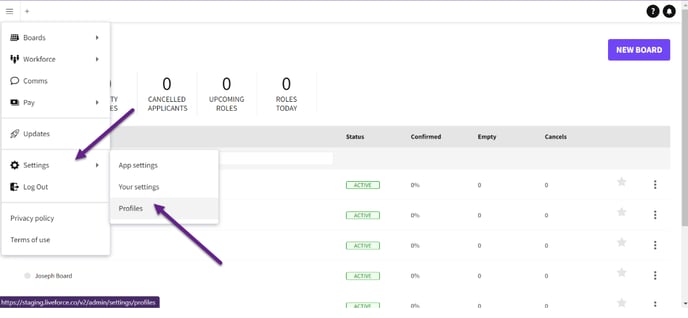*Navigate to SETTINGS\>PROFILES*
Select the Profile that you wish to customise the Report for.
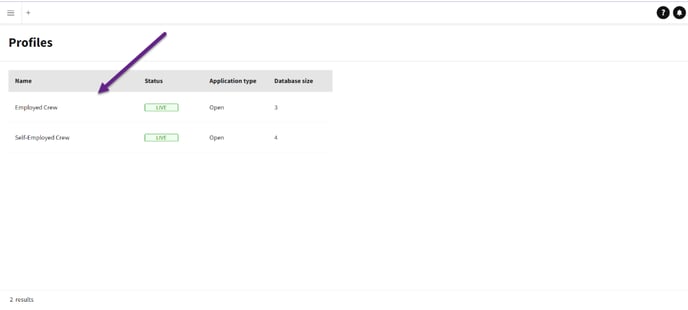*Selecting a profile*
Click on REPORTS tab.
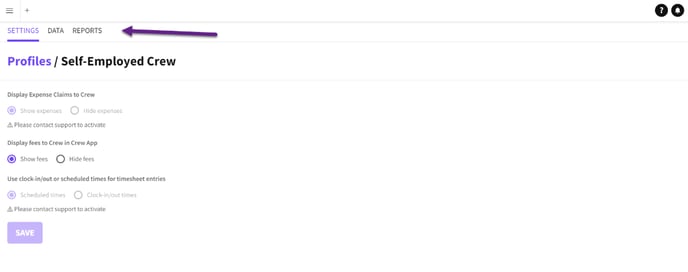*Click on the Reports tab*
Each Profile has two reports that can be customised. One for Salaries and the other for Expenses.
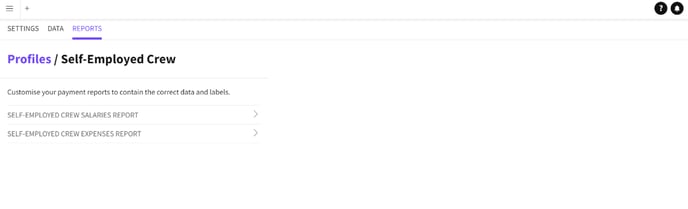*Click on the salaries or expenses reports*
To customise a Report click to expand the contents.
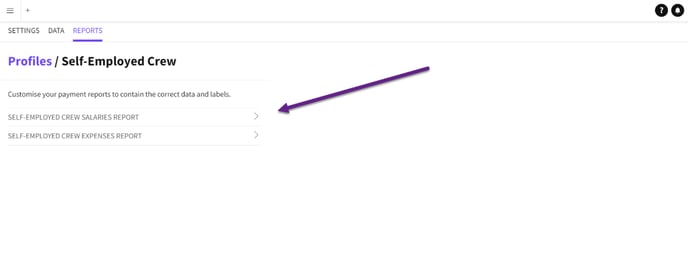*Expand or collapse report*
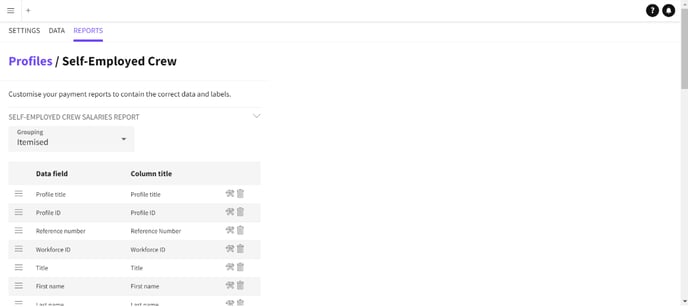*Expanded report*
Once a report is open you can ADD DATA to the report by clicking the Add Data button.
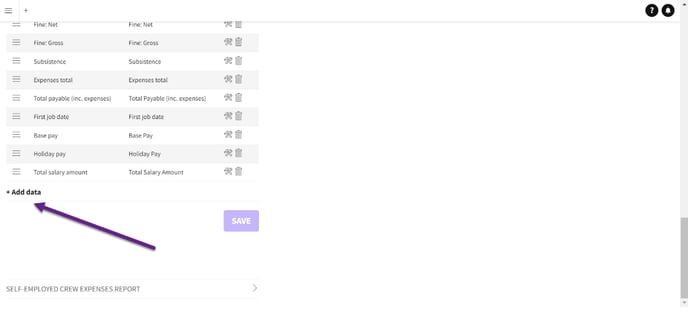*Adding data button*
The list includes Job data and any customised Profile data.
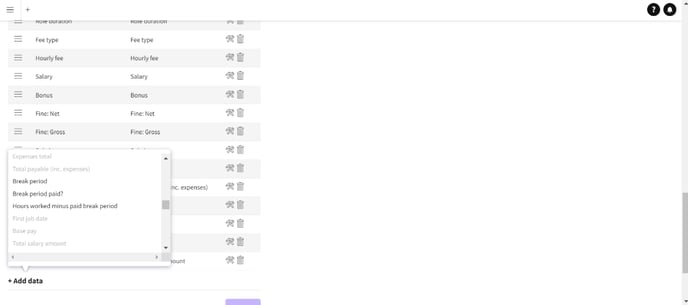*Data types*
You can drag and drop the data in the order you require it in the report.
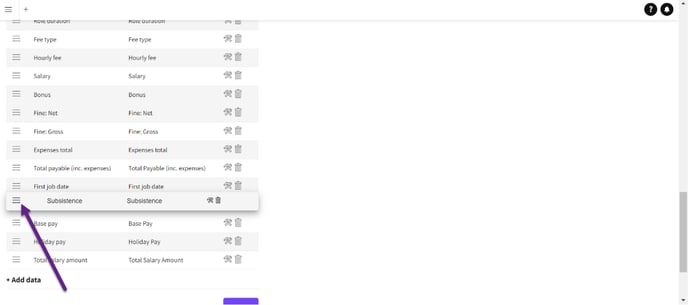*Dragging and dropping data*
To customise the column title just click on the edit icon.
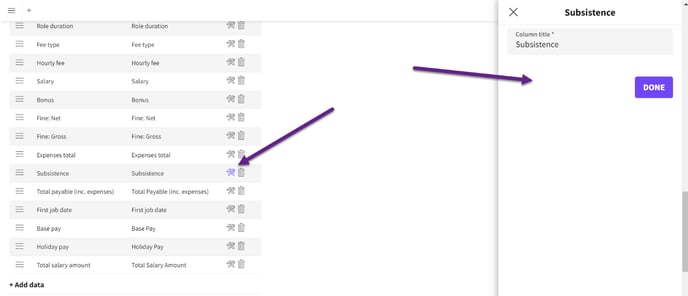*Customising the column title*
To delete a row that isn’t required in your report click the bin icon.
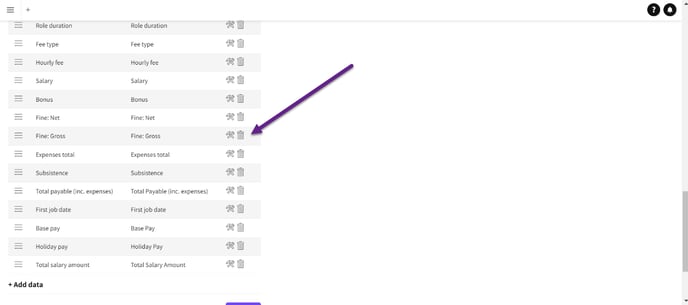*Deleting a column*
Click SAVE to confirm your changes.
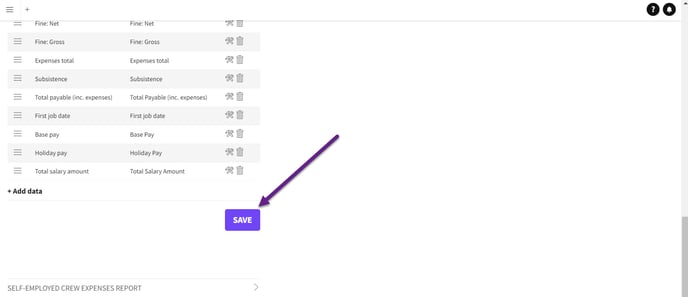*Save your changes*
#### Itemised or Grouped Data
You can choose how the role data appears when exported, as either ITEMISED or GROUPED
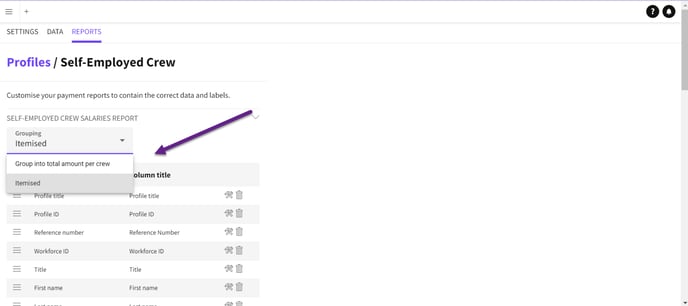
*Select itemised or grouped data*
If ITEMISED is chosen then all the jobs that Crew have completed will be listed on separate rows.
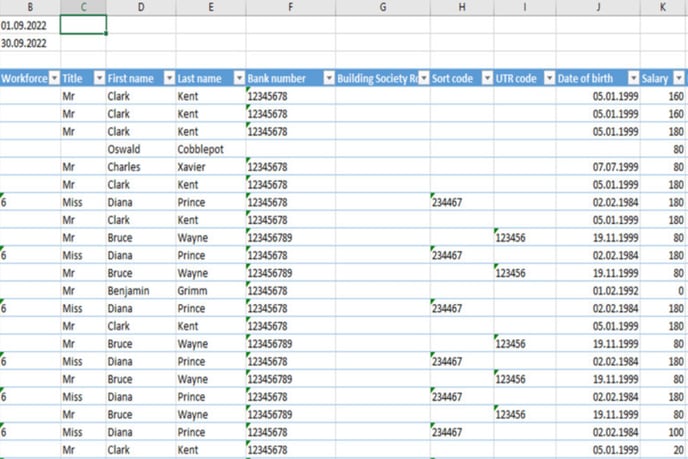*Itemised spreadsheet*
If GROUPED is chosen then all individual Crew Jobs will be combined and the total amounts will appear as a single row.
Not all data fields are available when data is grouped.
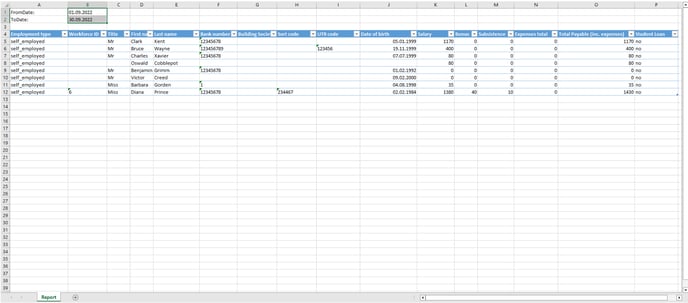*Grouped spreadsheet*
- [Training Academy](https://help.liveforce.co/en/admin/training-academy?hsLang=en)
- [The Basics](https://help.liveforce.co/en/admin/the-basics?hsLang=en)
- [Boards](https://help.liveforce.co/en/admin/boards?hsLang=en#main-content)
- [Timezones](https://help.liveforce.co/en/admin/boards?hsLang=en#timezones)
- [Job Scheduling](https://help.liveforce.co/en/admin/job-scheduling?hsLang=en#main-content)
- [Multiple Day Jobs](https://help.liveforce.co/en/admin/job-scheduling?hsLang=en#multiple-day-jobs)
- [Basics](https://help.liveforce.co/en/admin/job-scheduling?hsLang=en#basics)
- [Managing](https://help.liveforce.co/en/admin/job-scheduling?hsLang=en#managing)
- [Job Fulfilment](https://help.liveforce.co/en/admin/job-fulfilment?hsLang=en#main-content)
- [Methods](https://help.liveforce.co/en/admin/job-fulfilment?hsLang=en#methods)
- [Multi Day Jobs (1)](https://help.liveforce.co/en/admin/job-fulfilment?hsLang=en#multi-day-jobs-1)
- [Portfolio Sharing](https://help.liveforce.co/en/admin/job-fulfilment?hsLang=en#portfolio-sharing)
- [Basics](https://help.liveforce.co/en/admin/job-fulfilment?hsLang=en#basics)
- [Workforce Management](https://help.liveforce.co/en/admin/workforce-management?hsLang=en#main-content)
- [Managing](https://help.liveforce.co/en/admin/workforce-management?hsLang=en#managing)
- [Profiles](https://help.liveforce.co/en/admin/workforce-management?hsLang=en#profiles)
- [Data Validation](https://help.liveforce.co/en/admin/workforce-management?hsLang=en#data-validation)
- [Tags](https://help.liveforce.co/en/admin/workforce-management?hsLang=en#tags)
- [Status Page](https://help.liveforce.co/en/admin/status-page?hsLang=en)
- [Communications](https://help.liveforce.co/en/admin/communications?hsLang=en)
- [Tables](https://help.liveforce.co/en/admin/tables?hsLang=en)
- [Platform Set Up](https://help.liveforce.co/en/admin/platform-set-up?hsLang=en#main-content)
- [General](https://help.liveforce.co/en/admin/platform-set-up?hsLang=en#general)
- [Workforce Configuration](https://help.liveforce.co/en/admin/platform-set-up?hsLang=en#workforce-configuration)
- [Profiles](https://help.liveforce.co/en/admin/profiles?hsLang=en#main-content)
- [Settings](https://help.liveforce.co/en/admin/profiles?hsLang=en#settings)
- [Reports](https://help.liveforce.co/en/admin/profiles?hsLang=en#reports)
- [Data](https://help.liveforce.co/en/admin/profiles?hsLang=en#data)
- [Timesheets and Payments](https://help.liveforce.co/en/admin/timesheets-and-payments?hsLang=en)
- [Invoicing](https://help.liveforce.co/en/admin/invoicing?hsLang=en#main-content)
- [Payment Reports](https://help.liveforce.co/en/admin/invoicing?hsLang=en#payment-reports)
- [Getting Started](https://help.liveforce.co/en/admin/invoicing?hsLang=en#getting-started)
- [Approval Process](https://help.liveforce.co/en/admin/invoicing?hsLang=en#approval-process)
- [Invoicing Section](https://help.liveforce.co/en/admin/invoicing?hsLang=en#invoicing-section)
- [Invoicing Submission Types](https://help.liveforce.co/en/admin/invoicing?hsLang=en#invoicing-submission-types)
- [Contact Support](https://help.liveforce.co/en/admin/contact-support?hsLang=en)
- [FAQs](https://help.liveforce.co/en/admin/faqs?hsLang=en)
[](https://liveforce.co/)
Admin App | Knowledge Base