---
title: Inviting Crew to a Role
description: When you Invite Crew onto a Role they are given the opportunity to Accept or Decline that offer.
---
[Skip to content](https://help.liveforce.co/en/admin/inviting-crew-to-a-role#main-content)
[](https://liveforce.co/)
Open main navigation
Close main navigation
- [Log In](https://admin.liveforce.co/)
[Log In](https://admin.liveforce.co/)
Admin Knowledge Base
- There are no suggestions because the search field is empty.
1. [Admin App](https://help.liveforce.co/en/admin?hsLang=en)
2. [Job Fulfilment](https://help.liveforce.co/en/admin/job-fulfilment?hsLang=en)
3. [Methods](https://help.liveforce.co/en/admin/job-fulfilment?hsLang=en#methods)
March 10, 2025
# Inviting Crew to a Role
## When you Invite Crew onto a Role they are given the opportunity to Accept or Decline that offer.
#### Inviting Crew
When you Invite Crew onto a Role they are given the opportunity to Accept or Decline that offer.
- Click on the Role that you want to Invite Crew to and the Job Fulfilment popin will open
- Select INVITED from the sub-menu
- Type the Crew's name or email address to invite them to the Role
- Names will appear below to select from
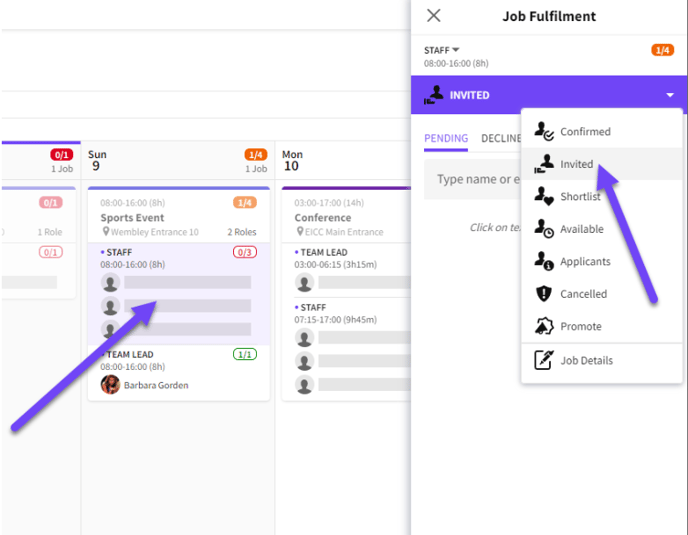
*Invited option in the Job Fulfilment pop-in*
#### Not Available
- If a Crew member is not available it will inform you as such and prevent a double-booking
- Additional information may also be available informing which Board/Job they are confirmed on or if they are unavailable
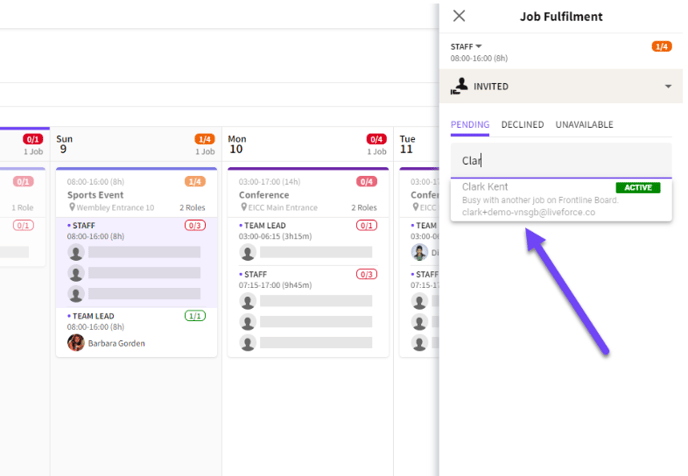
*Unavailable Crew highlighted*
#### Crew Confirmation
- Whenever Crew are invited it is possible to amend their fees on an individual basis
- By default it will use what has been added to the Role when it was created
- Click the CONFIRM button to add them to the Invited list
- No notification will be sent until the Job changes are Published
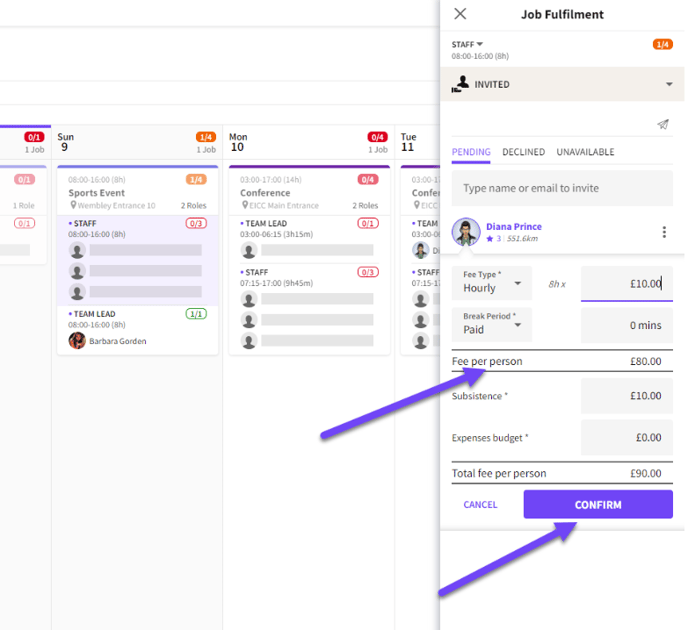
*Edit fees on a per Crew basis before confirming the invitation*
- The total number of invited Crew is visible on the Role
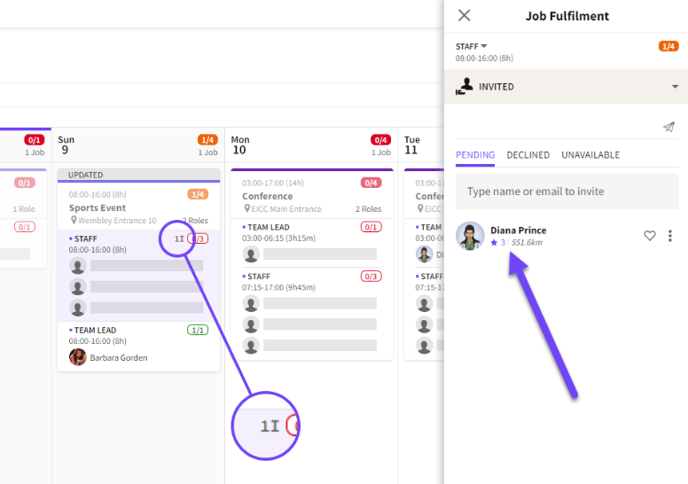
*Invite count visible on each Role*
- It is possible to Invite more Crew than slots available
- In these cases it becomes a first-come-first-confirmed scenario
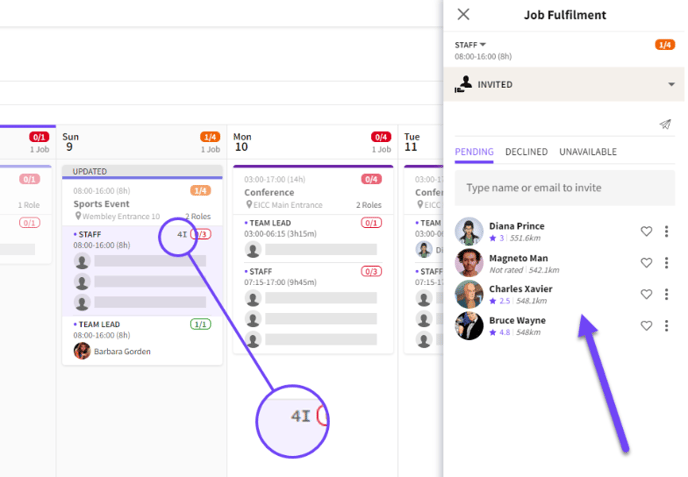
*Send more invites than slots available*
#### Multiple Bookings
- It is possible to select multiple Roles across multiple dates and Invite Crew onto the selected Roles at the same time
- Use the CTRL/CMD key to click into and select multiple Roles
- The Job Fulfilment pop-in will open automatically
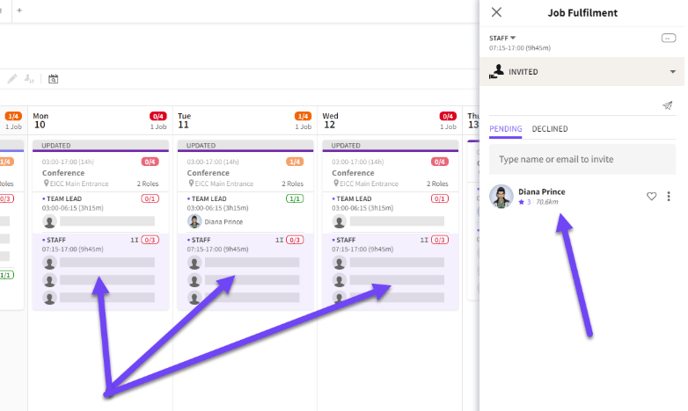*Invite Crew to multiple Jobs at the same time*
#### Crew App
- When the Job is Published an email invite is sent out
- In the Crew App the invited Crew now have the option to ACCEPT or DECLINE the offer
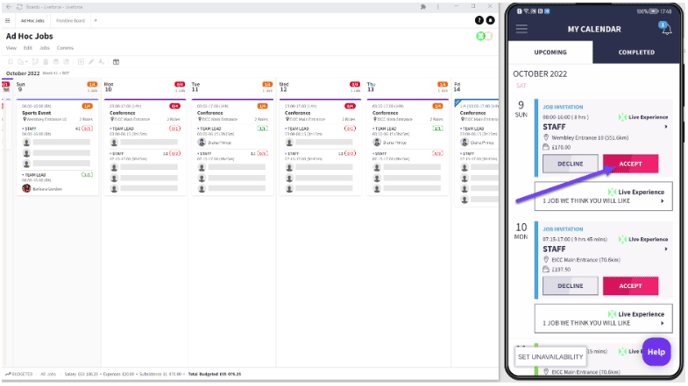*DECLINE and ACCEPT options in the Crew App*
#### Invitation Accepted
- When Crew Accept an Invite their avatar and name appear in a slot in real-time
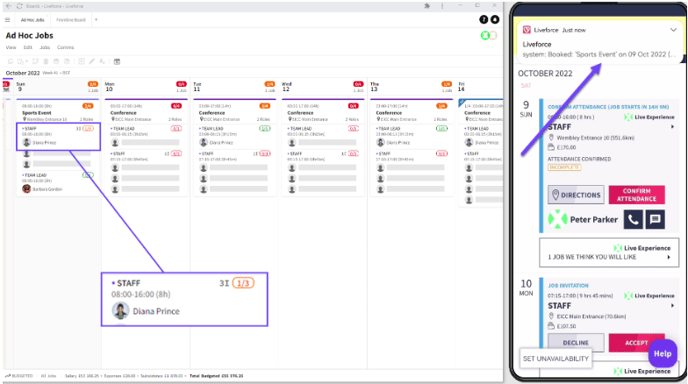*Invitation accepted*
#### Declined Invitation
- If Crew Decline an Invitation they will appear under the DECLINED list on the Invite tab
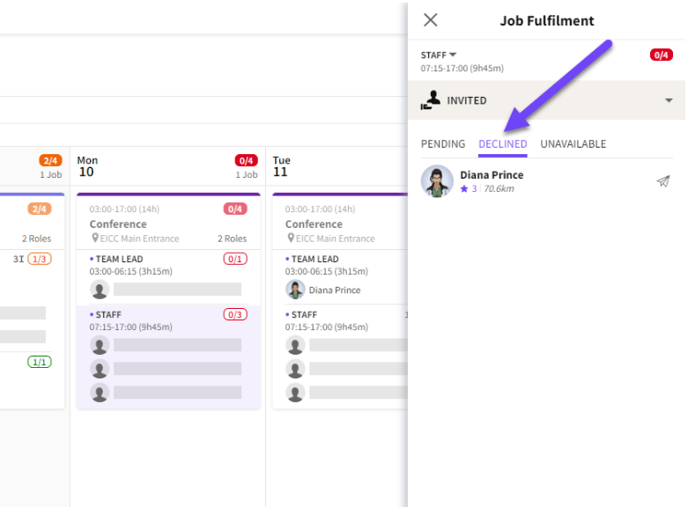*Declined list*
#### Crew Become Unavailable
- If the Invited Crew become unavailable before they respond to an Invite they will be moved to the UNAVAILABLE list on the Invited tab
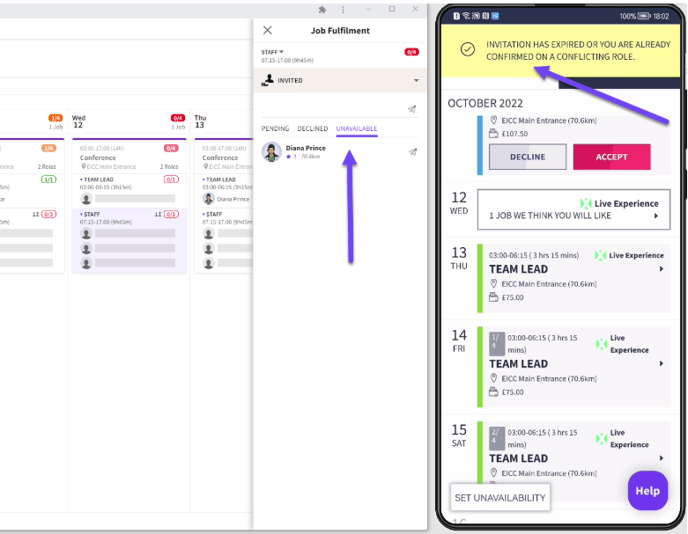*Unavailable list*
- [Training Academy](https://help.liveforce.co/en/admin/training-academy?hsLang=en)
- [The Basics](https://help.liveforce.co/en/admin/the-basics?hsLang=en)
- [Boards](https://help.liveforce.co/en/admin/boards?hsLang=en#main-content)
- [Timezones](https://help.liveforce.co/en/admin/boards?hsLang=en#timezones)
- [Job Scheduling](https://help.liveforce.co/en/admin/job-scheduling?hsLang=en#main-content)
- [Multiple Day Jobs](https://help.liveforce.co/en/admin/job-scheduling?hsLang=en#multiple-day-jobs)
- [Basics](https://help.liveforce.co/en/admin/job-scheduling?hsLang=en#basics)
- [Managing](https://help.liveforce.co/en/admin/job-scheduling?hsLang=en#managing)
- [Job Fulfilment](https://help.liveforce.co/en/admin/job-fulfilment?hsLang=en#main-content)
- [Methods](https://help.liveforce.co/en/admin/job-fulfilment?hsLang=en#methods)
- [Multi Day Jobs (1)](https://help.liveforce.co/en/admin/job-fulfilment?hsLang=en#multi-day-jobs-1)
- [Portfolio Sharing](https://help.liveforce.co/en/admin/job-fulfilment?hsLang=en#portfolio-sharing)
- [Basics](https://help.liveforce.co/en/admin/job-fulfilment?hsLang=en#basics)
- [Workforce Management](https://help.liveforce.co/en/admin/workforce-management?hsLang=en#main-content)
- [Managing](https://help.liveforce.co/en/admin/workforce-management?hsLang=en#managing)
- [Profiles](https://help.liveforce.co/en/admin/workforce-management?hsLang=en#profiles)
- [Data Validation](https://help.liveforce.co/en/admin/workforce-management?hsLang=en#data-validation)
- [Tags](https://help.liveforce.co/en/admin/workforce-management?hsLang=en#tags)
- [Status Page](https://help.liveforce.co/en/admin/status-page?hsLang=en)
- [Communications](https://help.liveforce.co/en/admin/communications?hsLang=en)
- [Tables](https://help.liveforce.co/en/admin/tables?hsLang=en)
- [Platform Set Up](https://help.liveforce.co/en/admin/platform-set-up?hsLang=en#main-content)
- [General](https://help.liveforce.co/en/admin/platform-set-up?hsLang=en#general)
- [Workforce Configuration](https://help.liveforce.co/en/admin/platform-set-up?hsLang=en#workforce-configuration)
- [Profiles](https://help.liveforce.co/en/admin/profiles?hsLang=en#main-content)
- [Settings](https://help.liveforce.co/en/admin/profiles?hsLang=en#settings)
- [Reports](https://help.liveforce.co/en/admin/profiles?hsLang=en#reports)
- [Data](https://help.liveforce.co/en/admin/profiles?hsLang=en#data)
- [Timesheets and Payments](https://help.liveforce.co/en/admin/timesheets-and-payments?hsLang=en)
- [Invoicing](https://help.liveforce.co/en/admin/invoicing?hsLang=en#main-content)
- [Payment Reports](https://help.liveforce.co/en/admin/invoicing?hsLang=en#payment-reports)
- [Getting Started](https://help.liveforce.co/en/admin/invoicing?hsLang=en#getting-started)
- [Approval Process](https://help.liveforce.co/en/admin/invoicing?hsLang=en#approval-process)
- [Invoicing Section](https://help.liveforce.co/en/admin/invoicing?hsLang=en#invoicing-section)
- [Invoicing Submission Types](https://help.liveforce.co/en/admin/invoicing?hsLang=en#invoicing-submission-types)
- [Contact Support](https://help.liveforce.co/en/admin/contact-support?hsLang=en)
- [FAQs](https://help.liveforce.co/en/admin/faqs?hsLang=en)
[](https://liveforce.co/)
Admin App | Knowledge Base