---
title: Crew Default Fees
description: Admins can set default hourly or fixed fees for each Crew in their workforce. Admins can also add a Secondary default fee for Crew. This allows Crew to be invited or confirmed onto a Role automatically at the correct rate.
---
[Skip to content](https://help.liveforce.co/en/admin/default-crew-fees#main-content)
[](https://liveforce.co/)
Open main navigation
Close main navigation
- [Log In](https://admin.liveforce.co/)
[Log In](https://admin.liveforce.co/)
Admin Knowledge Base
- There are no suggestions because the search field is empty.
1. [Admin App](https://help.liveforce.co/en/admin?hsLang=en)
2. [Workforce Management](https://help.liveforce.co/en/admin/workforce-management?hsLang=en)
3. [Profiles](https://help.liveforce.co/en/admin/workforce-management?hsLang=en#profiles)
February 25, 2025
# Crew Default Fees
## Admins can set default hourly or fixed fees for each Crew in their workforce. Admins can also add a Secondary default fee for Crew. This allows Crew to be invited or confirmed onto a Role automatically at the correct rate.
### Hourly and Fixed Rates
A default fee can be set for hourly or fixed rates. It will override the fee set for a Role.
Please note: The Crew’s default fee will not override any fees on previously confirmed Roles. Default fees only apply to bookings after a default fee has been set.
The default fee can be added to the Crew profile from a Board or the Workforce page.
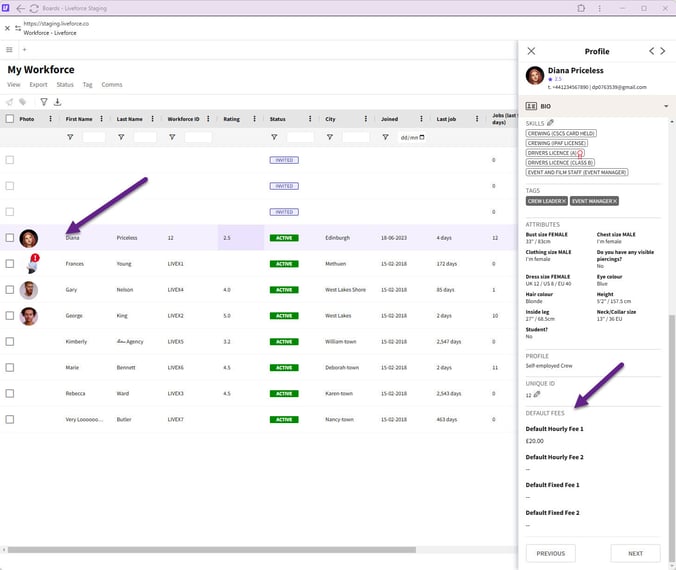
*Profile popin*
Admin creates a Role with a £30 per hour fee.
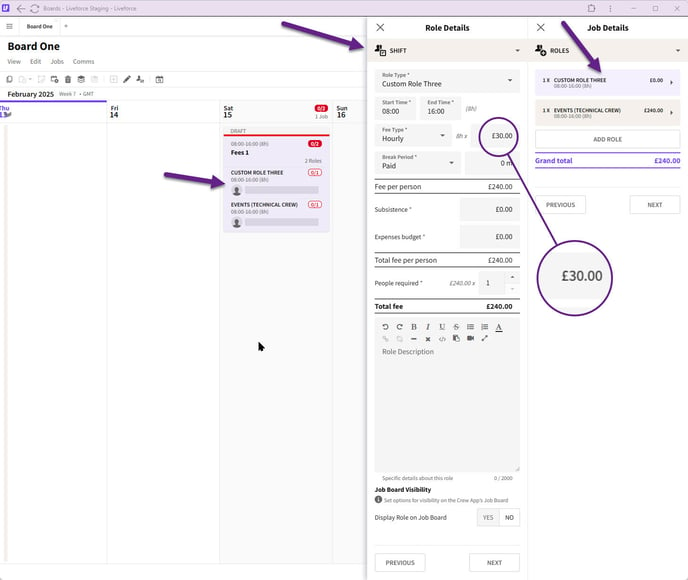
*Creating a Role*
Admin books Crew on this Role with a £15 per hour Default fee 2.
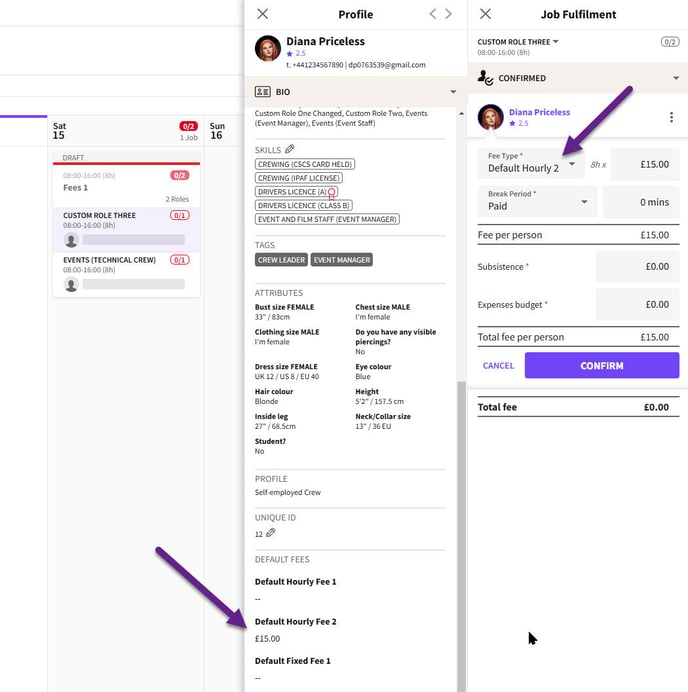
*Default fee 2 applied.*
The Crew default fee overrides the Role fee automatically. If Admin tries to add the Role hourly fee for this Crew then a fee change warning is highlighted.
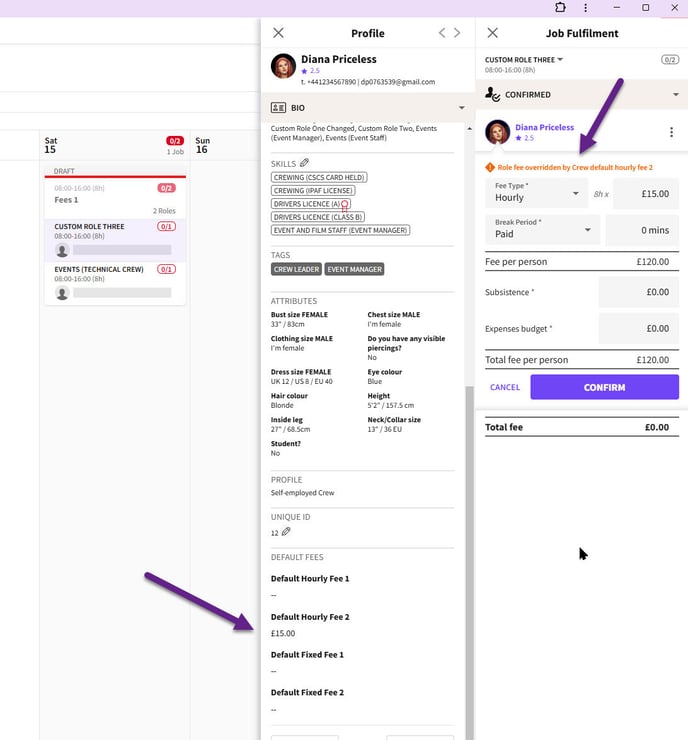
*Fee override message*
The same happens when Admin invites Crew.
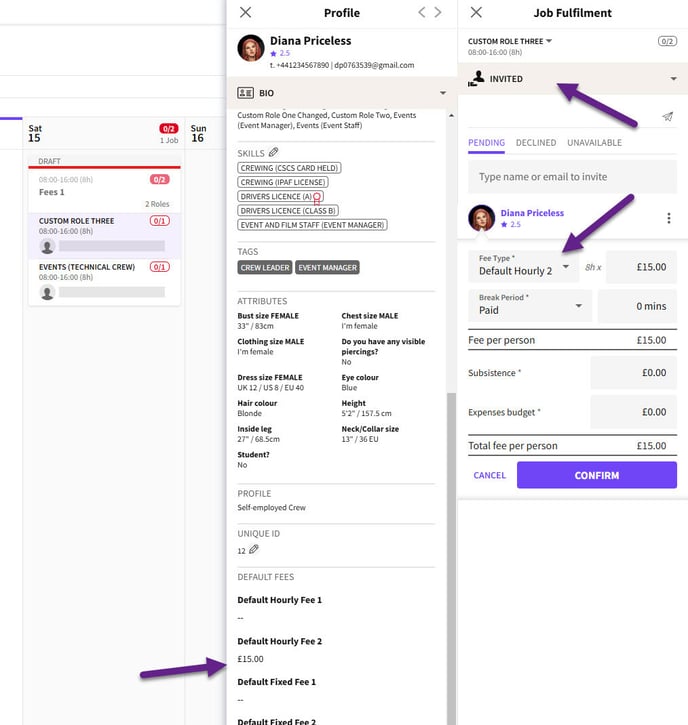
*Invited Crew*
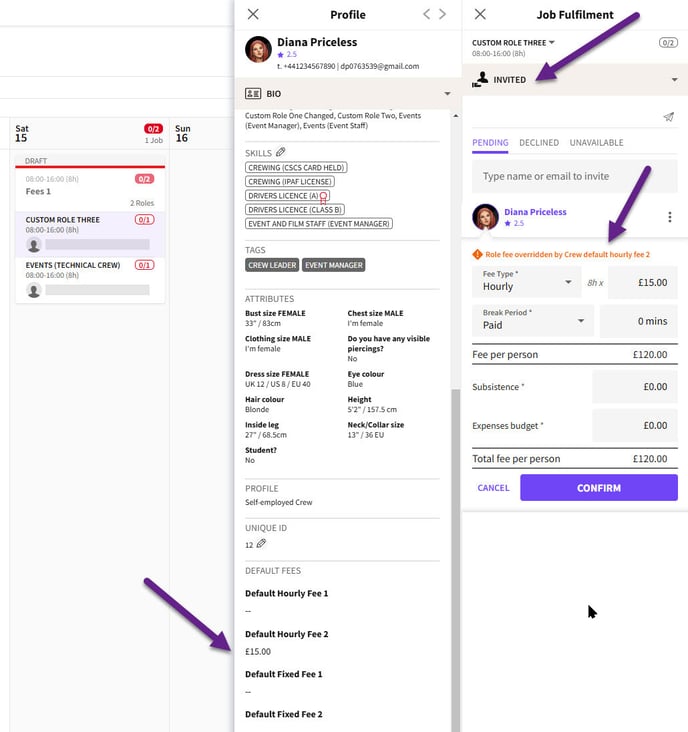
*Invite override warning*
The default hourly and fixed fees work the same way.
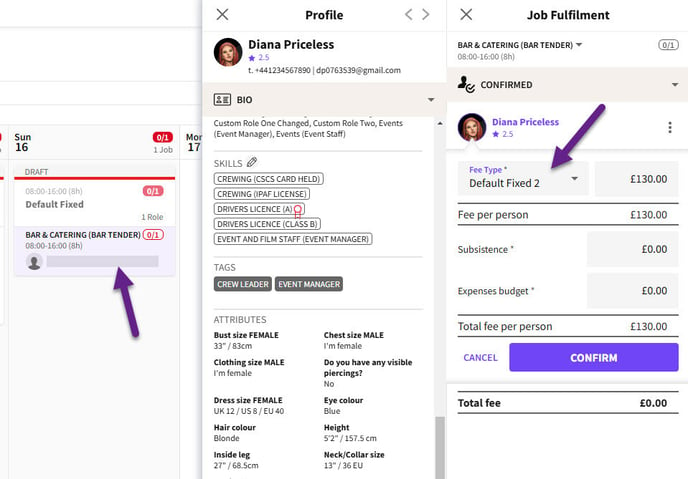
*Default Fixed fee 2*
*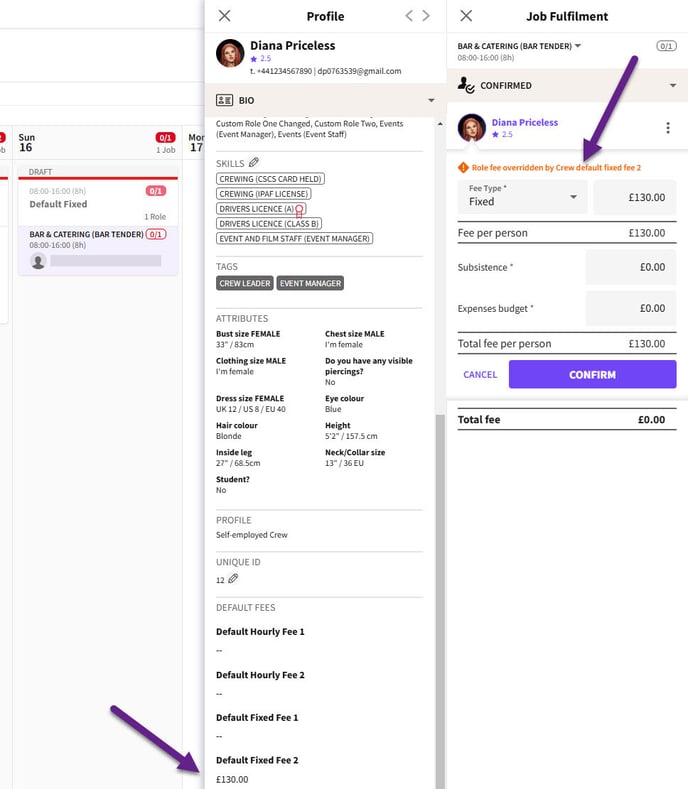*
*Fixed fee overide*
### **Crew App**
It’s important to note that if the Role is advertised in the Crew App on the Job Board, Crew will see the fee set when the Role was created, not their individual default fee.
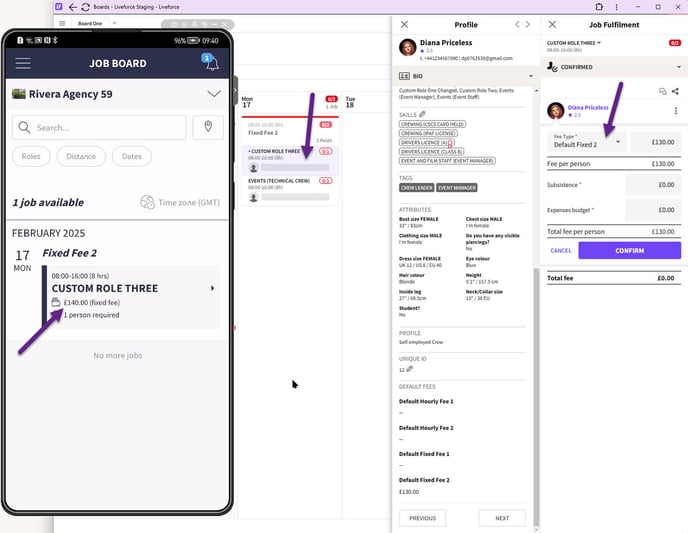
*Job Board*
Once Crew are confirmed Crew with a default fee will see their default fee and not the Role fee on the Job Details.
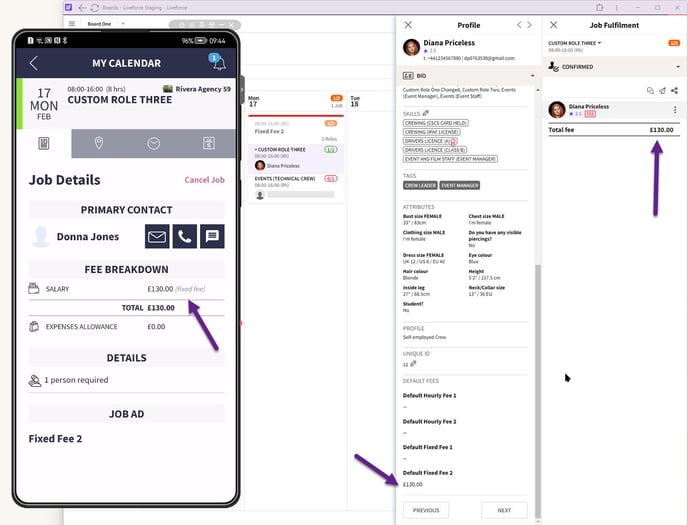
*Confirmed Job*
In the scenario where Crew are invited to a Role, when they check the fee in the Job details in the Invitation, they will see their default fee and not the fee set when the Role was created.
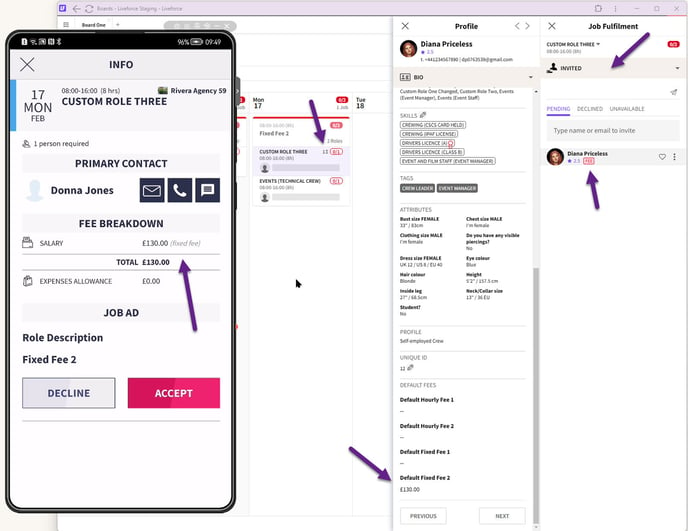
*Role invitation*
- [Training Academy](https://help.liveforce.co/en/admin/training-academy?hsLang=en)
- [The Basics](https://help.liveforce.co/en/admin/the-basics?hsLang=en)
- [Boards](https://help.liveforce.co/en/admin/boards?hsLang=en#main-content)
- [Timezones](https://help.liveforce.co/en/admin/boards?hsLang=en#timezones)
- [Job Scheduling](https://help.liveforce.co/en/admin/job-scheduling?hsLang=en#main-content)
- [Multiple Day Jobs](https://help.liveforce.co/en/admin/job-scheduling?hsLang=en#multiple-day-jobs)
- [Basics](https://help.liveforce.co/en/admin/job-scheduling?hsLang=en#basics)
- [Managing](https://help.liveforce.co/en/admin/job-scheduling?hsLang=en#managing)
- [Job Fulfilment](https://help.liveforce.co/en/admin/job-fulfilment?hsLang=en#main-content)
- [Methods](https://help.liveforce.co/en/admin/job-fulfilment?hsLang=en#methods)
- [Multi Day Jobs (1)](https://help.liveforce.co/en/admin/job-fulfilment?hsLang=en#multi-day-jobs-1)
- [Portfolio Sharing](https://help.liveforce.co/en/admin/job-fulfilment?hsLang=en#portfolio-sharing)
- [Basics](https://help.liveforce.co/en/admin/job-fulfilment?hsLang=en#basics)
- [Workforce Management](https://help.liveforce.co/en/admin/workforce-management?hsLang=en#main-content)
- [Managing](https://help.liveforce.co/en/admin/workforce-management?hsLang=en#managing)
- [Profiles](https://help.liveforce.co/en/admin/workforce-management?hsLang=en#profiles)
- [Data Validation](https://help.liveforce.co/en/admin/workforce-management?hsLang=en#data-validation)
- [Tags](https://help.liveforce.co/en/admin/workforce-management?hsLang=en#tags)
- [Status Page](https://help.liveforce.co/en/admin/status-page?hsLang=en)
- [Communications](https://help.liveforce.co/en/admin/communications?hsLang=en)
- [Tables](https://help.liveforce.co/en/admin/tables?hsLang=en)
- [Platform Set Up](https://help.liveforce.co/en/admin/platform-set-up?hsLang=en#main-content)
- [General](https://help.liveforce.co/en/admin/platform-set-up?hsLang=en#general)
- [Workforce Configuration](https://help.liveforce.co/en/admin/platform-set-up?hsLang=en#workforce-configuration)
- [Profiles](https://help.liveforce.co/en/admin/profiles?hsLang=en#main-content)
- [Settings](https://help.liveforce.co/en/admin/profiles?hsLang=en#settings)
- [Reports](https://help.liveforce.co/en/admin/profiles?hsLang=en#reports)
- [Data](https://help.liveforce.co/en/admin/profiles?hsLang=en#data)
- [Timesheets and Payments](https://help.liveforce.co/en/admin/timesheets-and-payments?hsLang=en)
- [Invoicing](https://help.liveforce.co/en/admin/invoicing?hsLang=en#main-content)
- [Payment Reports](https://help.liveforce.co/en/admin/invoicing?hsLang=en#payment-reports)
- [Getting Started](https://help.liveforce.co/en/admin/invoicing?hsLang=en#getting-started)
- [Approval Process](https://help.liveforce.co/en/admin/invoicing?hsLang=en#approval-process)
- [Invoicing Section](https://help.liveforce.co/en/admin/invoicing?hsLang=en#invoicing-section)
- [Invoicing Submission Types](https://help.liveforce.co/en/admin/invoicing?hsLang=en#invoicing-submission-types)
- [Contact Support](https://help.liveforce.co/en/admin/contact-support?hsLang=en)
- [FAQs](https://help.liveforce.co/en/admin/faqs?hsLang=en)
[](https://liveforce.co/)
Admin App | Knowledge Base