---
title: Copy and Pasting Jobs
description: Select the Job and click the COPY icon on the toolbar
---
[Skip to content](https://help.liveforce.co/en/admin/copy-and-pasting-jobs#main-content)
[](https://liveforce.co/)
Open main navigation
Close main navigation
- [Log In](https://admin.liveforce.co/)
[Log In](https://admin.liveforce.co/)
Admin Knowledge Base
- There are no suggestions because the search field is empty.
1. [Admin App](https://help.liveforce.co/en/admin?hsLang=en)
2. [Job Scheduling](https://help.liveforce.co/en/admin/job-scheduling?hsLang=en)
3. [Managing](https://help.liveforce.co/en/admin/job-scheduling?hsLang=en#managing)
July 10, 2025
# Copy and Pasting Jobs
## Select the Job and click the COPY icon on the toolbar
### Single-Day Job
- Select the Job and click the COPY icon on the toolbar (or CTL/CMD + C on your keyboard) to copy that Job.
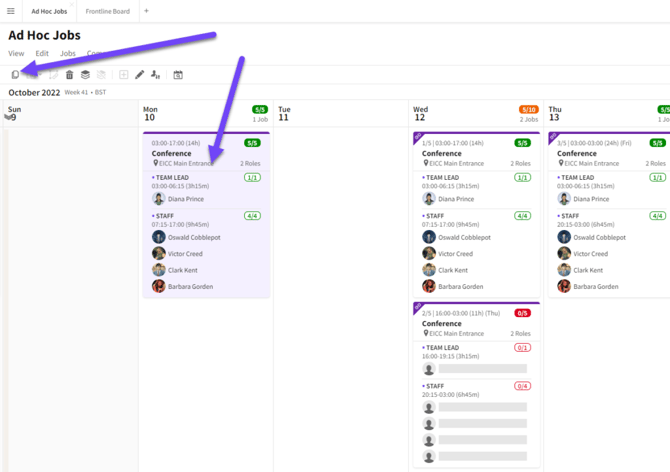
*Copy a Single-Day Job*
- Select a date(s) you wish to paste a copy of the Job into.
- Click the PASTE icon on the toolbar or use your keyboard shortcut CTRL/CMD + V or the menu paste button.
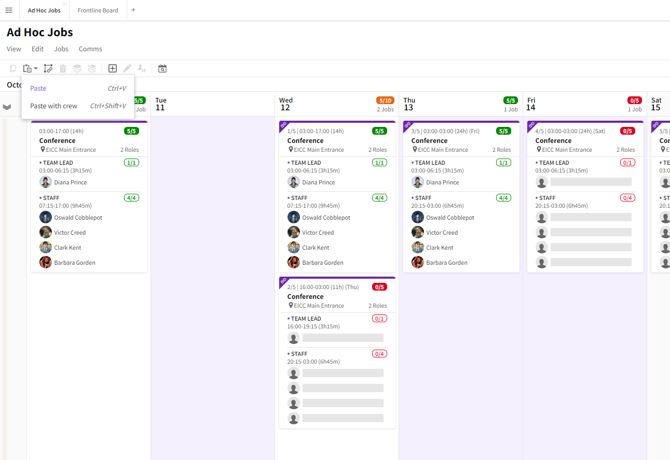
*Selecting dates to add copies of the Job to*
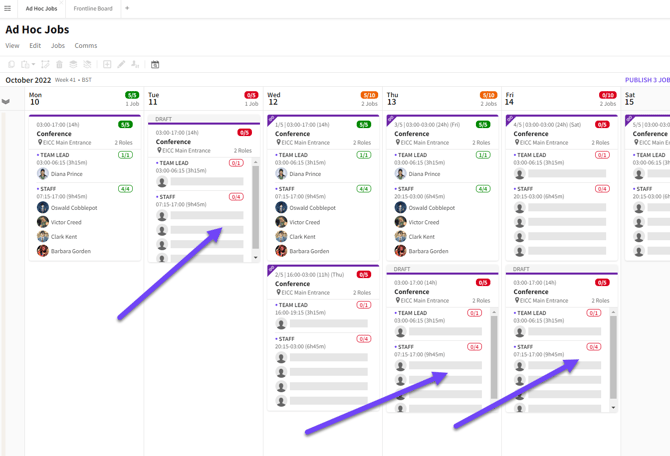
*Pasted Single-Day Jobs*
#### Copy A Range Of Jobs
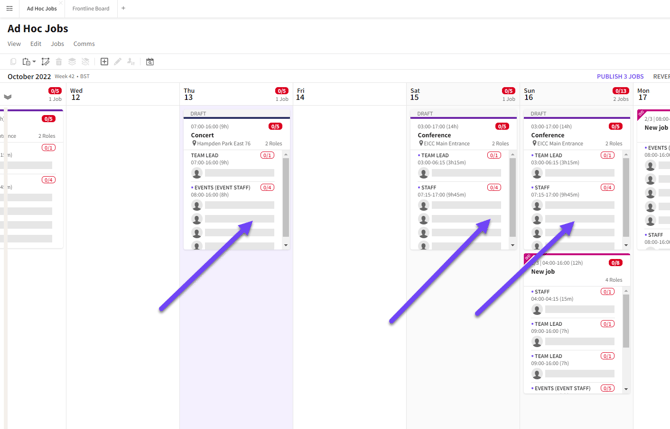
You can select a range of Jobs or multiple Jobs to copy and paste. This could be a whole event or a template of Jobs you want to use again on a future date.
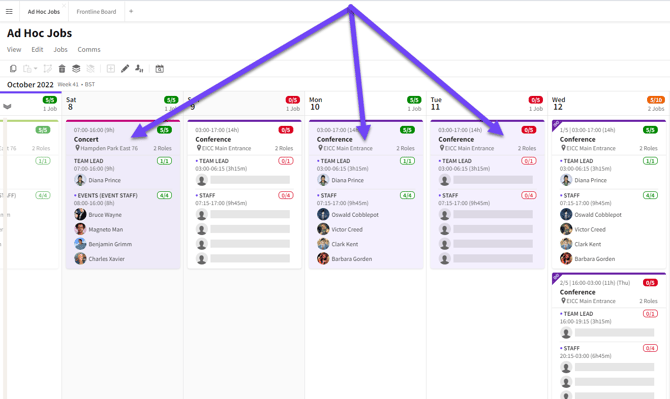
*Select and copy a range of Jobs*
**
*Paste a range of Jobs*
#### Copy And Paste With Crew
- Jobs can be copied and pasted with Crew on. To do this first select a Job with Crew and copy it.
- Then select the date(s) you wish to paste a copy too.
- Then paste using the menu button PASTE WITH CREW or the keyboard shortcut SHIFT + CTL/CMD + V.
- When you Publish the Job the system will check that the Crew are available.
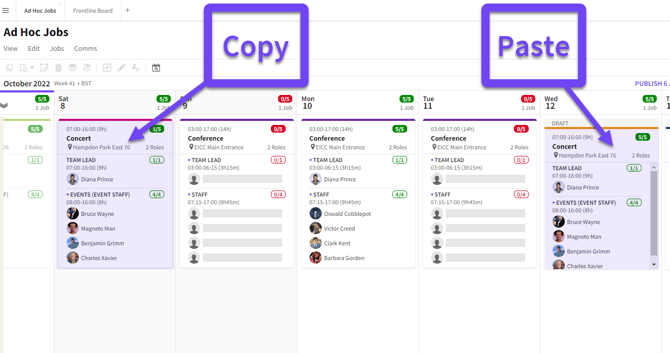
*Copy and paste with Crew*
#### Multi-Day Jobs
Multi-Day Jobs can be copied and pasted just like Single-Day Jobs. This can be with, or without Crew.
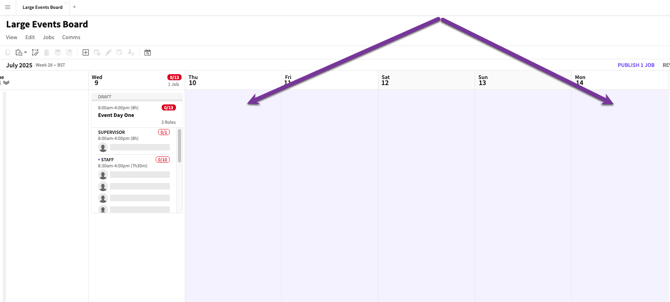
*A pasted Multi-Day Job*
### Create a Single-Day Job From A Multi-Day Job
You can copy and paste individual dates of a Multi-Day Job. When this is done they can become a Single-Day Job when pasted using normal pasting method. Select the Job, copy it then paste into the new date.
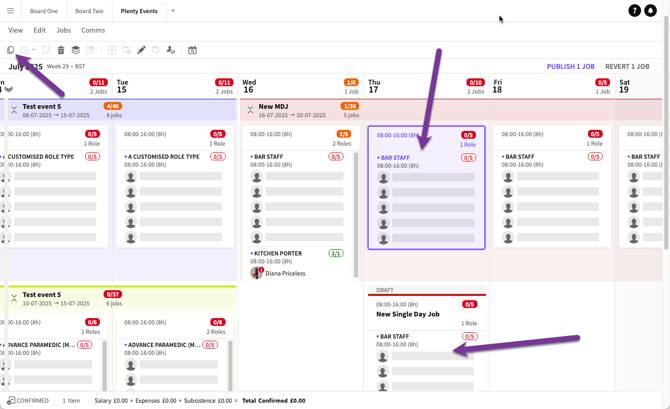
*Individual date of Multi-Day Job becomes a Single-Day Job when pasted*
### Paste As Linked Job
To add a new date to the Job, a user selects an existing Job, copies it, and pastes it into one or more new dates.
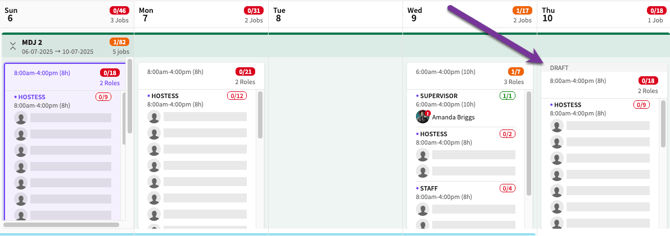
*Copying a Single-Day Job within a Multi-Day Job becomes part of that sequence of linked Jobs*
- [Training Academy](https://help.liveforce.co/en/admin/training-academy?hsLang=en)
- [The Basics](https://help.liveforce.co/en/admin/the-basics?hsLang=en)
- [Boards](https://help.liveforce.co/en/admin/boards?hsLang=en#main-content)
- [Timezones](https://help.liveforce.co/en/admin/boards?hsLang=en#timezones)
- [Job Scheduling](https://help.liveforce.co/en/admin/job-scheduling?hsLang=en#main-content)
- [Multiple Day Jobs](https://help.liveforce.co/en/admin/job-scheduling?hsLang=en#multiple-day-jobs)
- [Basics](https://help.liveforce.co/en/admin/job-scheduling?hsLang=en#basics)
- [Managing](https://help.liveforce.co/en/admin/job-scheduling?hsLang=en#managing)
- [Job Fulfilment](https://help.liveforce.co/en/admin/job-fulfilment?hsLang=en#main-content)
- [Methods](https://help.liveforce.co/en/admin/job-fulfilment?hsLang=en#methods)
- [Multi Day Jobs (1)](https://help.liveforce.co/en/admin/job-fulfilment?hsLang=en#multi-day-jobs-1)
- [Portfolio Sharing](https://help.liveforce.co/en/admin/job-fulfilment?hsLang=en#portfolio-sharing)
- [Basics](https://help.liveforce.co/en/admin/job-fulfilment?hsLang=en#basics)
- [Workforce Management](https://help.liveforce.co/en/admin/workforce-management?hsLang=en#main-content)
- [Managing](https://help.liveforce.co/en/admin/workforce-management?hsLang=en#managing)
- [Profiles](https://help.liveforce.co/en/admin/workforce-management?hsLang=en#profiles)
- [Data Validation](https://help.liveforce.co/en/admin/workforce-management?hsLang=en#data-validation)
- [Tags](https://help.liveforce.co/en/admin/workforce-management?hsLang=en#tags)
- [Status Page](https://help.liveforce.co/en/admin/status-page?hsLang=en)
- [Communications](https://help.liveforce.co/en/admin/communications?hsLang=en)
- [Tables](https://help.liveforce.co/en/admin/tables?hsLang=en)
- [Platform Set Up](https://help.liveforce.co/en/admin/platform-set-up?hsLang=en#main-content)
- [General](https://help.liveforce.co/en/admin/platform-set-up?hsLang=en#general)
- [Workforce Configuration](https://help.liveforce.co/en/admin/platform-set-up?hsLang=en#workforce-configuration)
- [Profiles](https://help.liveforce.co/en/admin/profiles?hsLang=en#main-content)
- [Settings](https://help.liveforce.co/en/admin/profiles?hsLang=en#settings)
- [Reports](https://help.liveforce.co/en/admin/profiles?hsLang=en#reports)
- [Data](https://help.liveforce.co/en/admin/profiles?hsLang=en#data)
- [Timesheets and Payments](https://help.liveforce.co/en/admin/timesheets-and-payments?hsLang=en)
- [Invoicing](https://help.liveforce.co/en/admin/invoicing?hsLang=en#main-content)
- [Payment Reports](https://help.liveforce.co/en/admin/invoicing?hsLang=en#payment-reports)
- [Getting Started](https://help.liveforce.co/en/admin/invoicing?hsLang=en#getting-started)
- [Approval Process](https://help.liveforce.co/en/admin/invoicing?hsLang=en#approval-process)
- [Invoicing Section](https://help.liveforce.co/en/admin/invoicing?hsLang=en#invoicing-section)
- [Invoicing Submission Types](https://help.liveforce.co/en/admin/invoicing?hsLang=en#invoicing-submission-types)
- [Contact Support](https://help.liveforce.co/en/admin/contact-support?hsLang=en)
- [FAQs](https://help.liveforce.co/en/admin/faqs?hsLang=en)
[](https://liveforce.co/)
Admin App | Knowledge Base